Fraud Blocker

Contact sales

Fresh KDS Enterprise

Know which promises your kitchens kept

Fresh KDS is the kitchen display and performance platform for multi-location operators that provides order-by-order visibility into whether every location delivered on time, and what to change when it didn't.
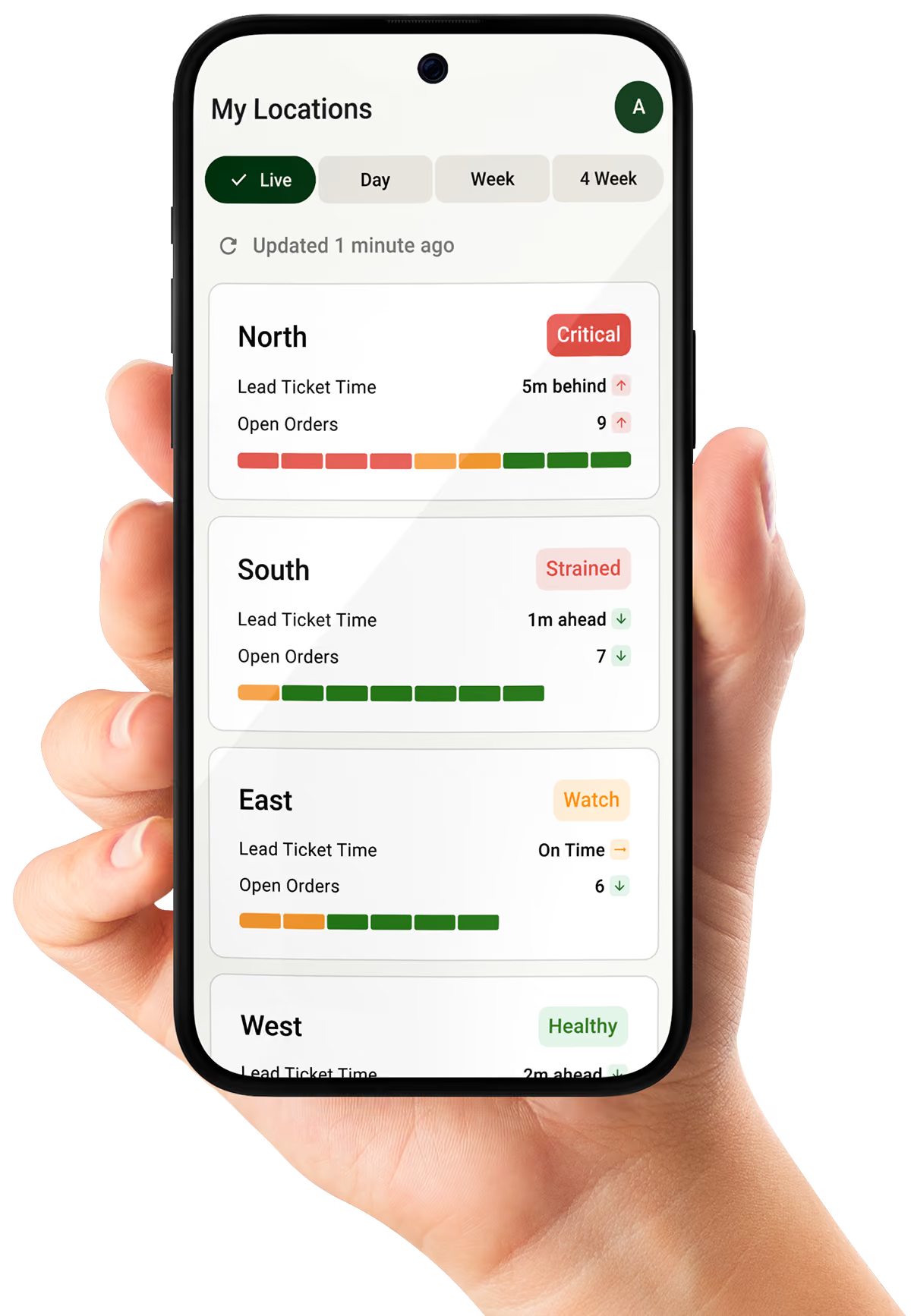
Status cards for locations showing lead ticket times, open orders, forgotten orders, and health statuses.Dashboard showing ticket times and order status for seven locations with color-coded health indicators.
Trusted by 10,000+ restaurants
The problem

Every order is a promise. At scale, you can't see which ones you're breaking, or what they cost you.

The promise is simple: the right food, ready when the guest expects it. Pickup at 5:30 means 5:30. Keep it and you earn the next visit. Break it, late, early, or wrong, and the guest rarely complains. They just come back less often.

Your reporting can't catch it. No guest experiences your average: two locations can post identical ticket times while one keeps your promise and the other swings between too early and too late.
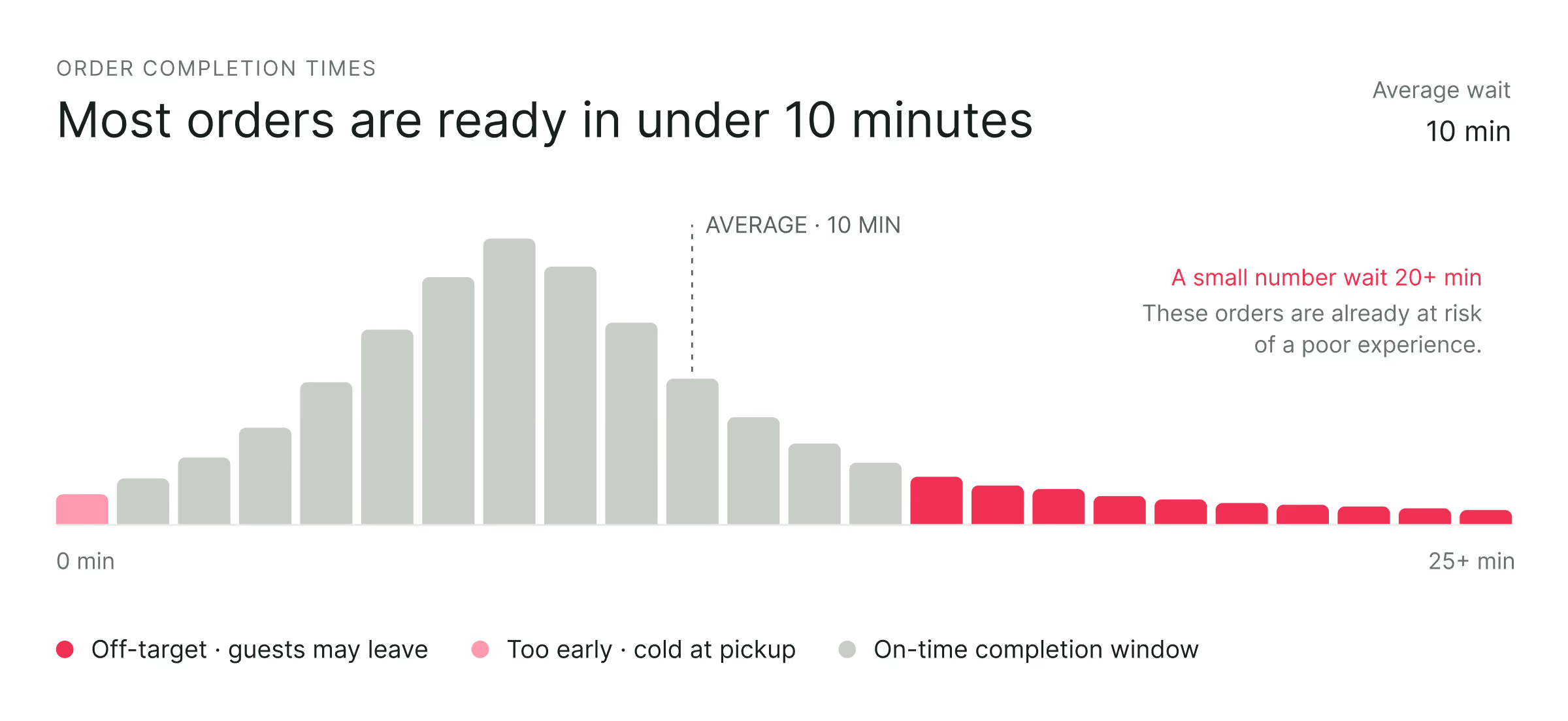
Bar chart showing order completion times with most orders ready in under 10 minutes. Bars rise and fall peaking around 10 minutes with average wait labeled as 10 min. Dark pink bars represent 'Off-target: guests may leave' from around 18 to 25+ minutes. Light pink bars represent 'Too early: cold at pickup' at 0 minutes. Gray bars represent 'On-time completion window' from 1 to about 17 minutes. Text notes that a small number wait 20+ minutes, risking poor experience.

Your reporting can't catch it. No guest experiences your average: two locations can post identical ticket times while one keeps your promise and the other swings between too early and too late.

The screen
captures execution as the kitchen works
The record
structures it, order by order, against each channel's on-time target
The intelligence
finds what broke and recommends the fix
Your systems
take the data anywhere through the API
60%

of restaurant revenue is driven by repeat guests (Olo, from 100M+ guest records). After the food itself, timing is among the strongest drivers of whether a guest returns.

You don't need another dashboard that averages it away. You need to know, order by order, whether each kitchen kept the promise your brand made, and what to change when it didn't.
Why you can't see it

Speed of service isn't faster; it's the promise kept

The industry has chased speed of service for decades, and speed is the wrong standard. A pickup order finished eighteen minutes early sits in a bag losing heat. Every channel makes its own timing promise, and the standard that fits them all is on time: each order done when the guest expects it.

The tools you own can't show it. Your POS display records almost nothing. The systems that record everything pour it into a clunky reporting tool and leave you to find the story: thousands of numbers, none measured against a standard. Metrics without meaning.

"Faster"
One clock for every channel and every order
Early counts as a win, even as the food loses heat
Averages that no guest ever experiences
On time
Built to display tickets, not to measure performance
No view into how each kitchen actually runs
Often tied to proprietary or POS-specific hardware
Fresh KDS is built the other way around. The target comes first: every channel gets its own definition of on time, because every channel carries a different promise. Every order is measured against it. That orientation is what turns data into visibility: where the promise breaks, and what to change.

Not a display. A Performance Platform.

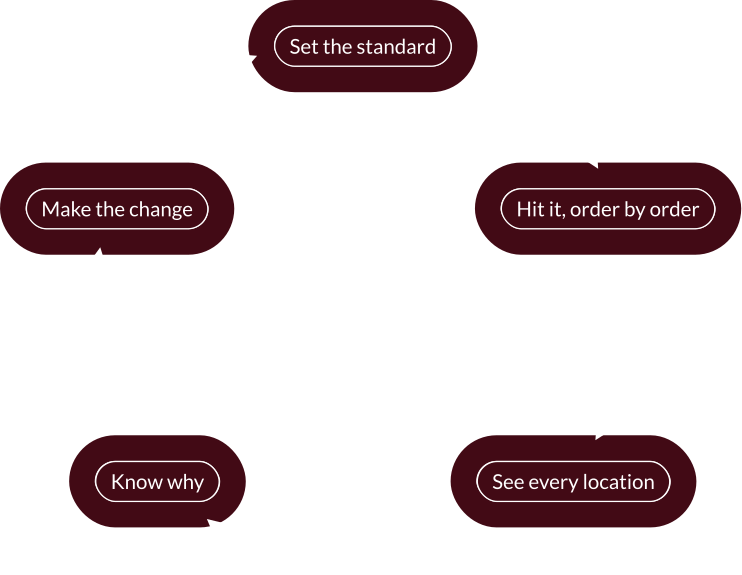
Set the standard, hit it, watch it, understand it, fix it, and take the data anywhere.

And everything the loop learns is yours to build on through the Intelligence API.
Set the standard

Define what on time means for every location and every channel. Pickup, dine-in, and delivery each get their own targets, including whether early counts against you. Set one location at a time, or push targets to a thousand locations at once.

Dashboard screen titled Salemtown showing order time status for In-Store and Online. In-Store times are categorized as Too Fast (0-2 min), On Time (2-6 min), Off Target (7-9 min), and Late (10-13 min) with color-coded bars representing these ranges and explanations for each. Online orders have Pickup, Off Target, and Late categories. There is a toggle for Early orders are Off Target.

Hit it, order by order

The screen works backward from each order's promise. Item timing holds the salad and fires it after the steak, so the whole order lands at expo together. On time, not early, not rushed.
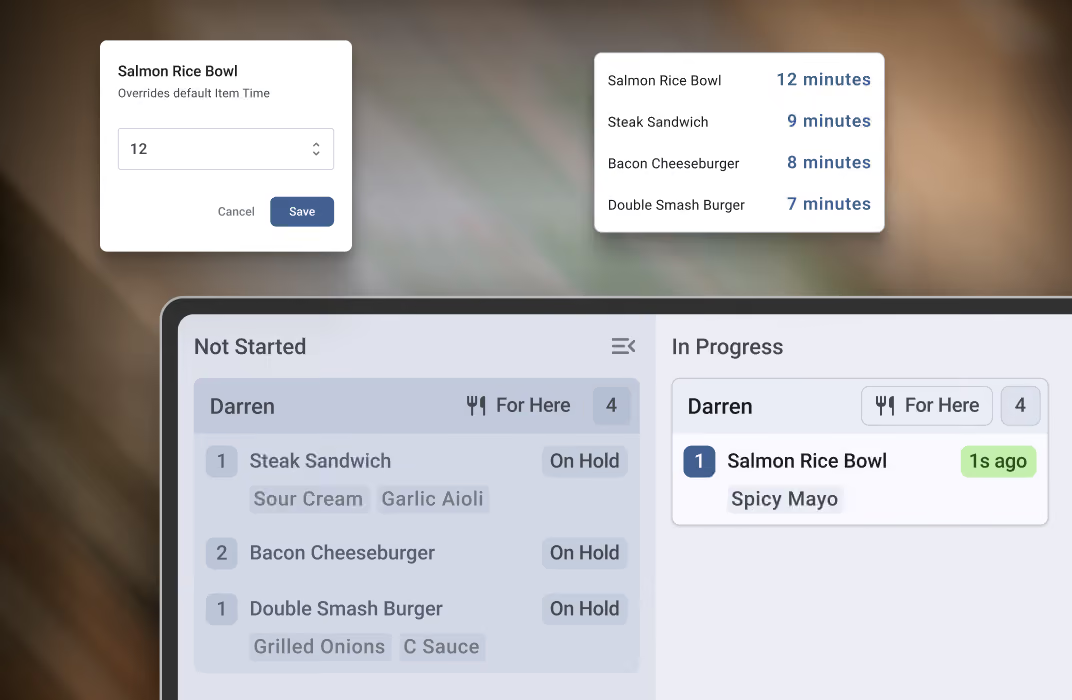
User interface showing kitchen order management system with two sections: 'Not Started' listing three pending orders (Steak Sandwich, Bacon Cheeseburger, Double Smash Burger) all on hold, and 'In Progress' showing one order (Salmon Rice Bowl with Spicy Mayo) being prepared since 1 second ago. Popups display overriding item time set to 12 minutes for Salmon Rice Bowl, and a list of default cooking times for items from 7 to 12 minutes.

See every location, live

One login, every kitchen. Watch service as it happens, compare locations side by side, and see which orders kept their promise, down to the item and the station.
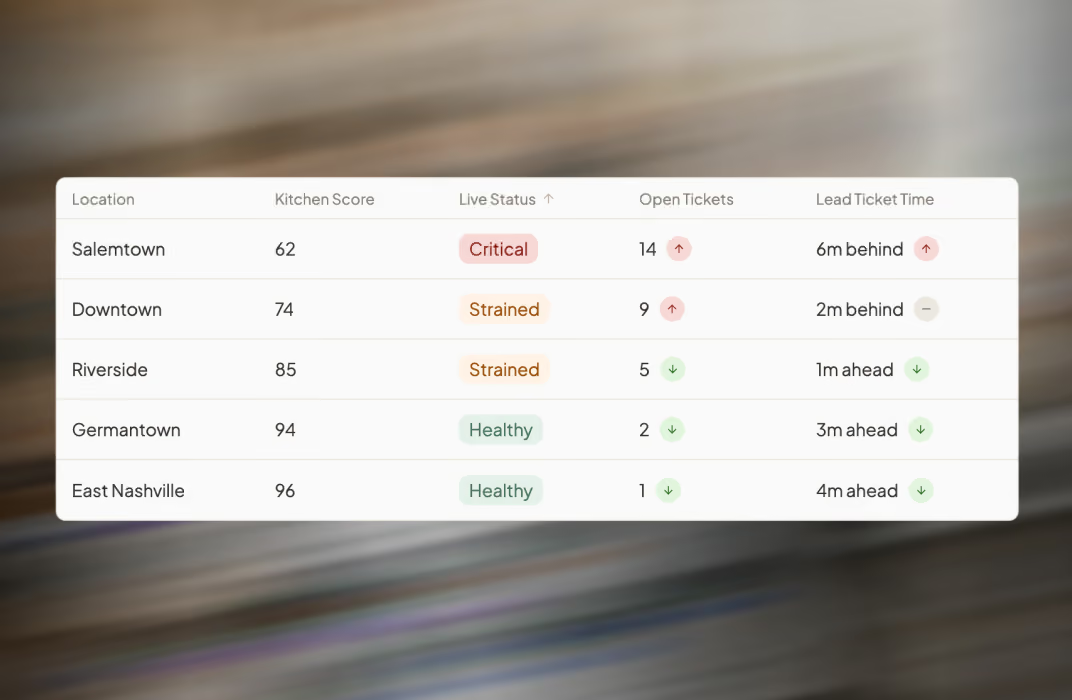
Table showing location data with columns for kitchen score, live status, open tickets, and lead ticket time for five locations: Salemtown, Downtown, Riverside, Germantown, and East Nashville. Salemtown has a kitchen score of 62, critical status, 14 open tickets, and is 6 minutes behind. Downtown has a 74 score, strained status, 9 open tickets, and is 2 minutes behind. Riverside has an 85 score, strained status, 5 open tickets, and is 1 minute ahead. Germantown has a 94 score, healthy status, 2 open tickets, and is 3 minutes ahead. East Nashville has a 96 score, healthy status, 1 open ticket, and is 4 minutes ahead.

Know why, and what to change

When a location misses, Fresh reads that day's execution record and tells you what happened, why, and the specific setting to change. A recommendation you can act on, not another report to interpret.

Two white notification cards with text about optimizing kitchen station workflows: one about fryer station throughput with a location tag 'The Gulch,' and one about reassigning salad station routing with a location tag 'Germantown.'

Make the change, everywhere at once

Knowing what to change only matters if you can change it. Build a screen profile once, group your locations, and push the update to every kitchen that needs it. One save. No engineering ticket, no screen-by-screen rebuild.

Popup dialog box titled 'Push to screens' asking if user wants to push Expo settings to 17 screens with immediate update, offering Cancel and Push buttons.

Build on the record

Your kitchens' execution data belongs to you. The Intelligence API delivers kitchen scores, on-time performance, and item-level timing to your BI stack, your warehouse, or whatever you build next.

Fresh KDS Intelligence API interface with a green button labeled 'Create your first key' featuring a key icon.
Partnership

Built to scale with your operation

Contact sales
100+

Taziki’s locations running Fresh KDS across its growing restaurant operation

15+

Years partnering with Taziki’s as its brand and restaurant footprint have grown

"One of the key things for a growing restaurant is technology. Fresh KDS came along and helped empower our business to structure what it does and prepared it to scale."
Dan Simpson, Chief Executive Officer at Taziki's Mediterranean Cafe
Speed to value

Deployment shouldn't be a construction project.

Some enterprise kitchen systems arrive with an engineering team. Data models get built for each screen, at each location, and once the rollout is done, changing anything means scheduling another one. The configuration is the project.

Fresh KDS treats configuration as something you build once. Create a screen profile in the web app, assign it across your locations, and push a change to every screen the moment you save. No site visit, no rebuild, no ticket.

The legacy deployment
Engineers on site.
A data model built per screen, per location.
Changes after rollout mean another engagement.
The Fresh deployment
A screen profile, built once in the web app.
Assigned across locations in groups.
Changes push to every screen on save.
Simple to deploy and simple to change is why kitchens actually run on it. It's also why we can start with a pilot instead of a project plan.
How rollout works

Live in a pilot before most vendors finish the paperwork.

The pilot defines success before you commit to the fleet. If the numbers aren't there, you'll know in weeks, not quarters.

Contact sales
1

Pilot

Pick 5 to 25 locations and define success with us up front: the on-time targets you expect to hit and the visibility you expect to gain. Screens install on hardware you already know, and kitchens run on them the same week.
2

Phased rollout

Targets, station setups, and configuration push from above to each wave of locations. No store-by-store rebuild, no retraining tour.
3

Full fleet

Every location reporting against the same standard, compared in one view, with new locations inheriting your configuration on day one.
No proprietary hardware

Runs on standard iOS and Android tablets, so there's nothing special to source, image, or replace.

Connects to your POS

Orders flow in automatically from major POS platforms, including Square, Clover, Oracle Simphony, Lightspeed, Qu, and PAR.

Built for IT review

Endpoints, ports, and IP ranges are published up front, so your network and security teams can vet everything before install.

Your data stays yours

Every location's kitchen execution data is yours to export and analyze, at any point in the rollout.

A team through full fleet

A dedicated account team from pilot to full rollout, backed by a 99.9% uptime SLA with service credits.

Fresh KDS Enterprise

Manage and improve kitchen performance across every location

See where performance needs attention. Compare live and historical performance across your brand, from orders missing guest expectations down to the stations and items where time is being lost.
Know what to improve and why. Fresh KDS analyzes your kitchen data, surfaces specific recommendations, and shows the evidence behind each one.
Configure once. Push changes across locations. Build reusable screen profiles in the browser and send approved settings to assigned screens in seconds, without updating devices one by one.

Contact sales

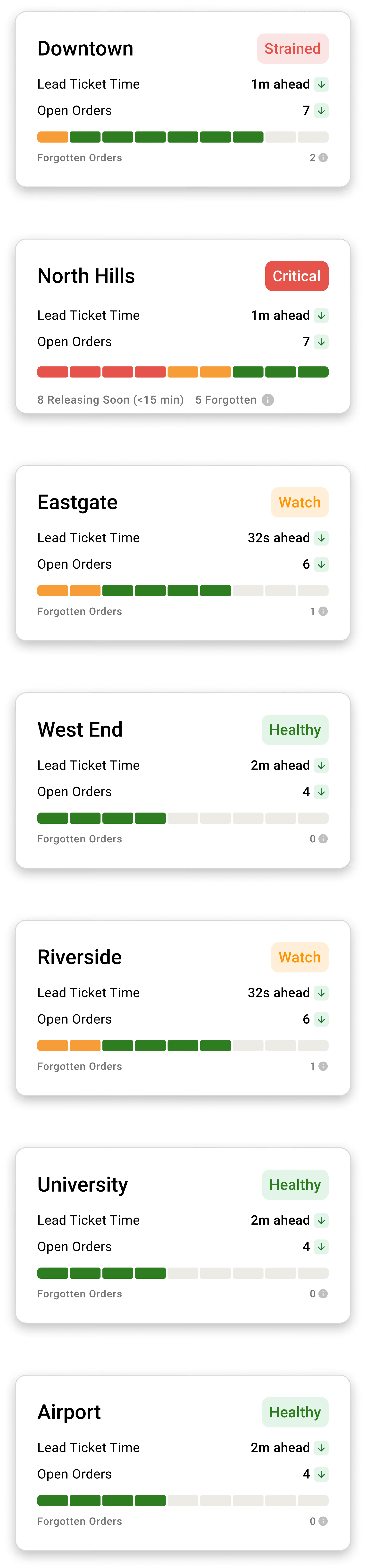
Status cards for locations showing lead ticket times, open orders, forgotten orders, and health statuses.Dashboard showing ticket times and order status for seven locations with color-coded health indicators.
Trusted by 10,000+ restaurants
Beyond order display

Order displays alone don't reveal kitchen performance

A KDS tracks orders in a restaurant. Leadership sees which locations lag, where delays happen, and how many orders are affected.

Fresh KDS connects kitchen activity into a brand-wide view, helping your team focus, identify issues, and improve performance.

Contact sales
Kitchen team running Fresh KDS, with a display tracking live ticket times and delays by location.
Performance, execution & management

See, run, and manage every kitchen from one system

Connect brand-wide performance with the tools teams use to keep orders on time and the controls operators need to manage Fresh KDS across locations.

Kitchen performance

See live and historical performance across your brand, from orders missing guest expectations down to the stations and items where time is being lost.

Contact sales

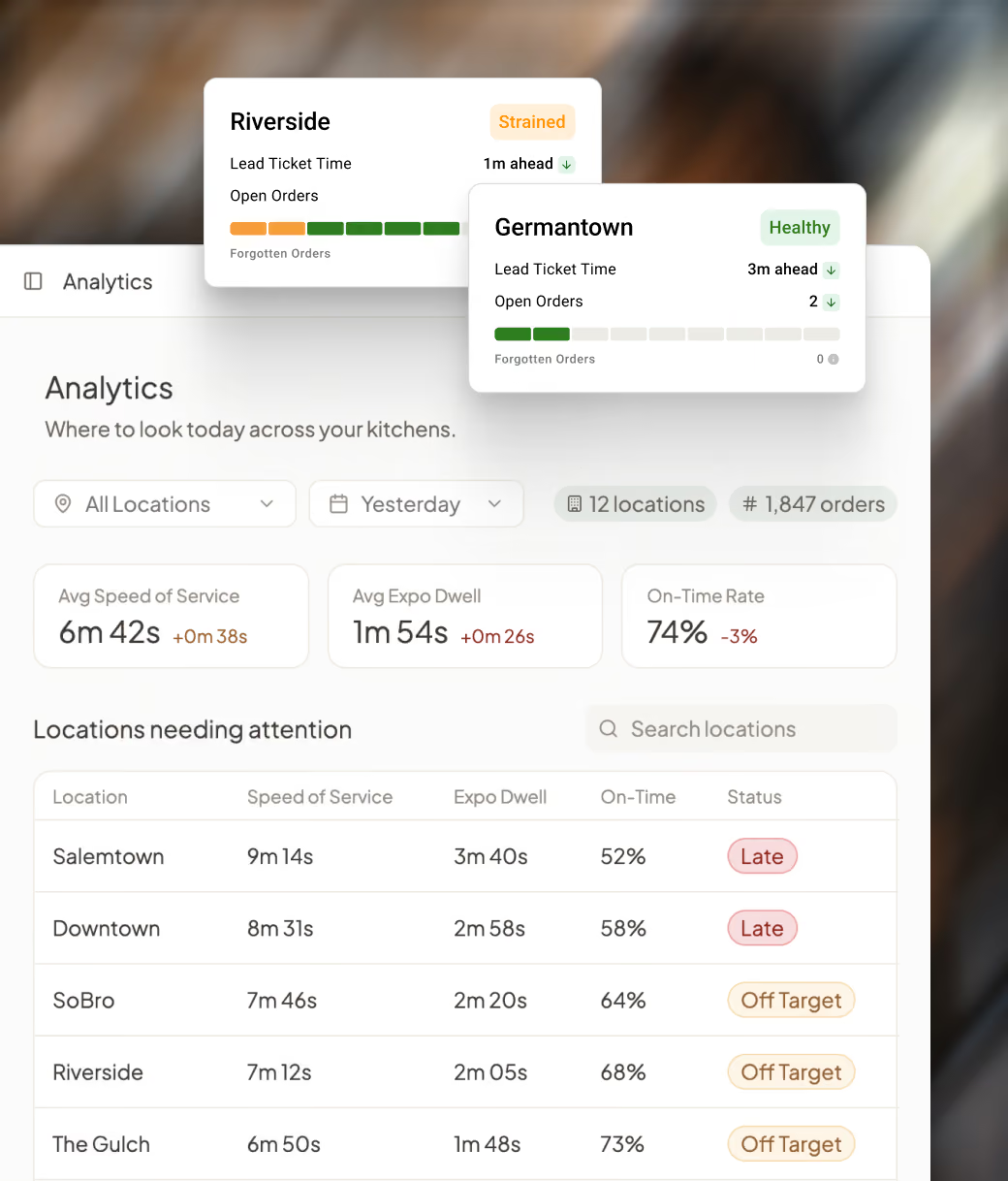
Know which kitchens need attention right now

Fresh KDS Performance dashboard tracking service speed, expo dwell, and on-time rate across locations.

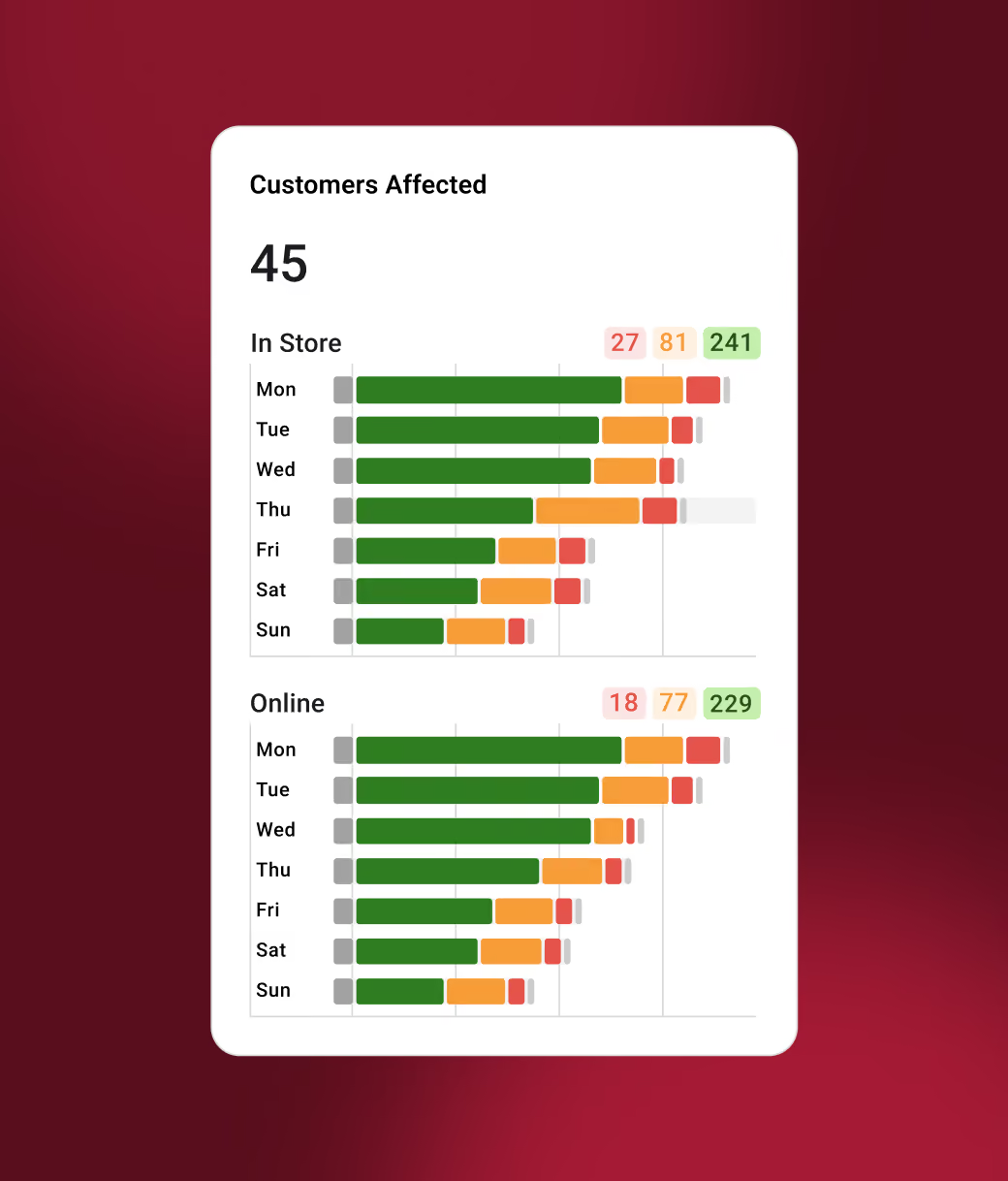
See when orders miss guest expectations

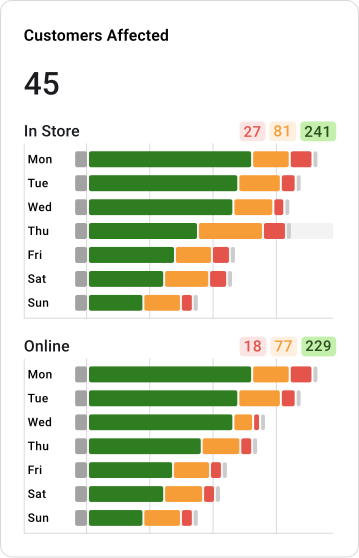
Fresh KDS Performance charts showing customers affected in-store versus online by day of week.

Find where time is being lost

Fresh KDS Performance view of item prep times and station queue depths, with typical and longest times.

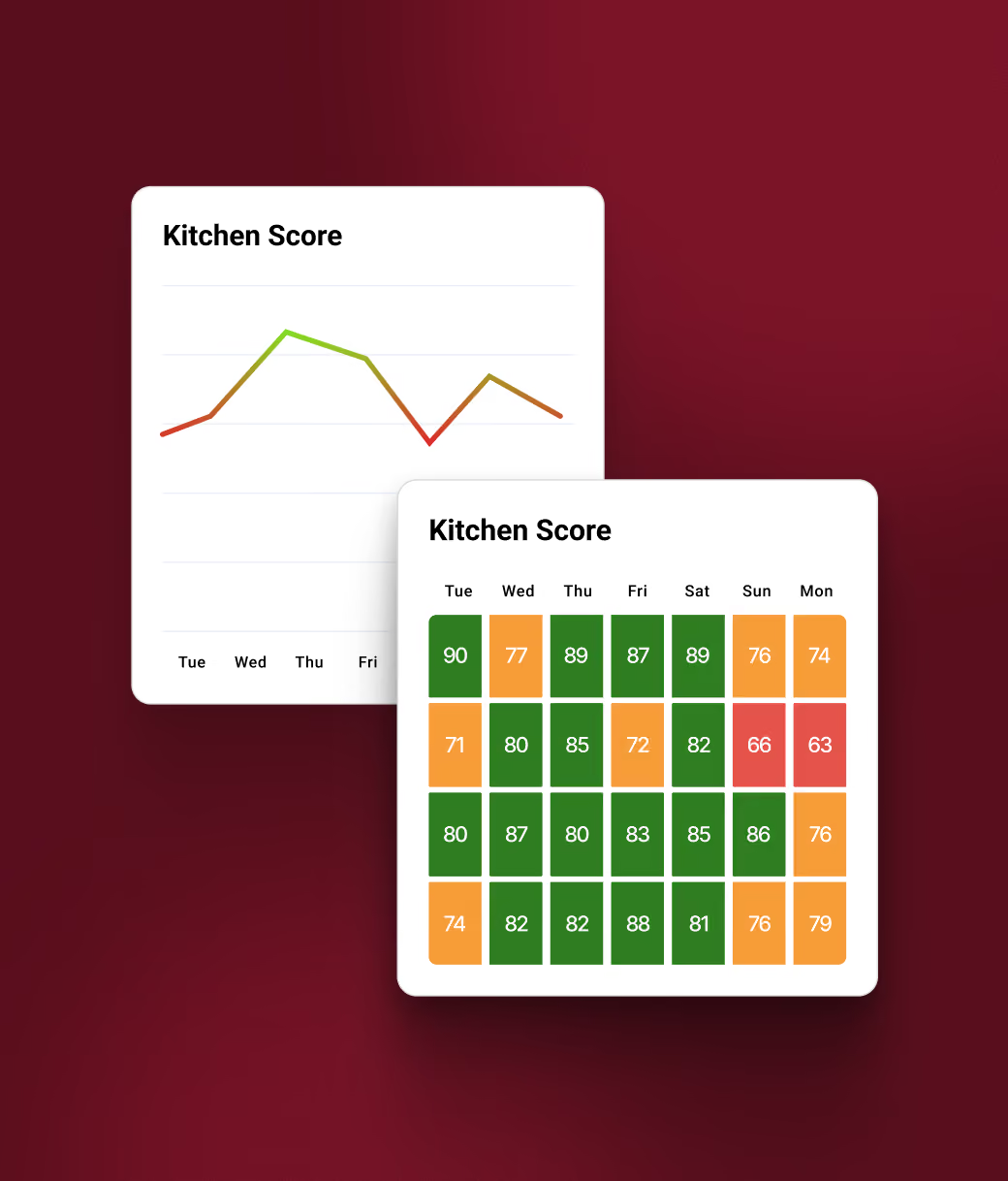
Know whether changes are actually working

Fresh KDS Kitchen Score trends charted alongside daily scores across the week.

Kitchen workflows

Give teams better ways to manage timing, prep, and station coordination so orders come together when guests expect them.

Contact sales
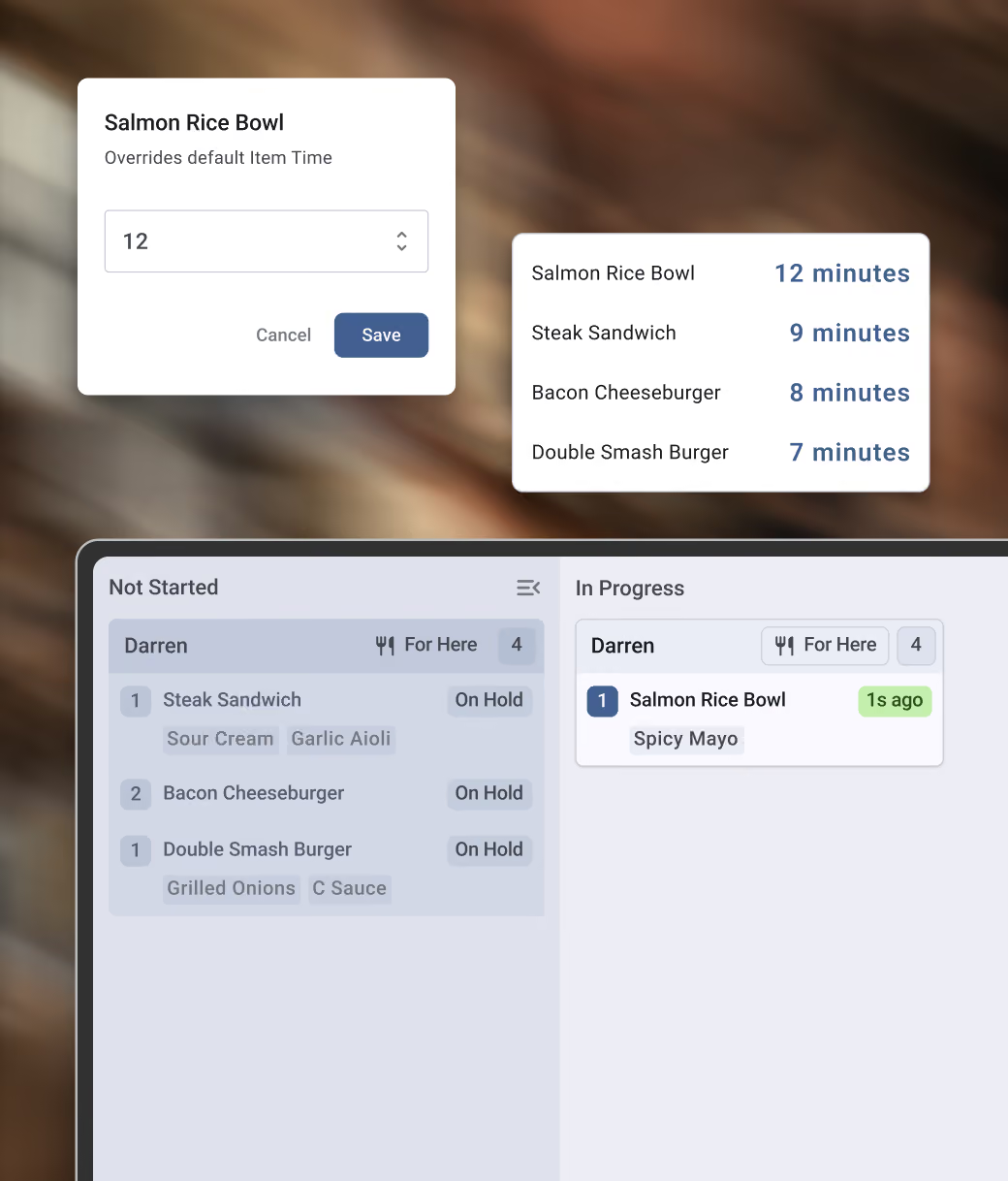
Get every item ready together

Fresh KDS Execution screen showing live prep times and status for items like a Salmon Rice Bowl.

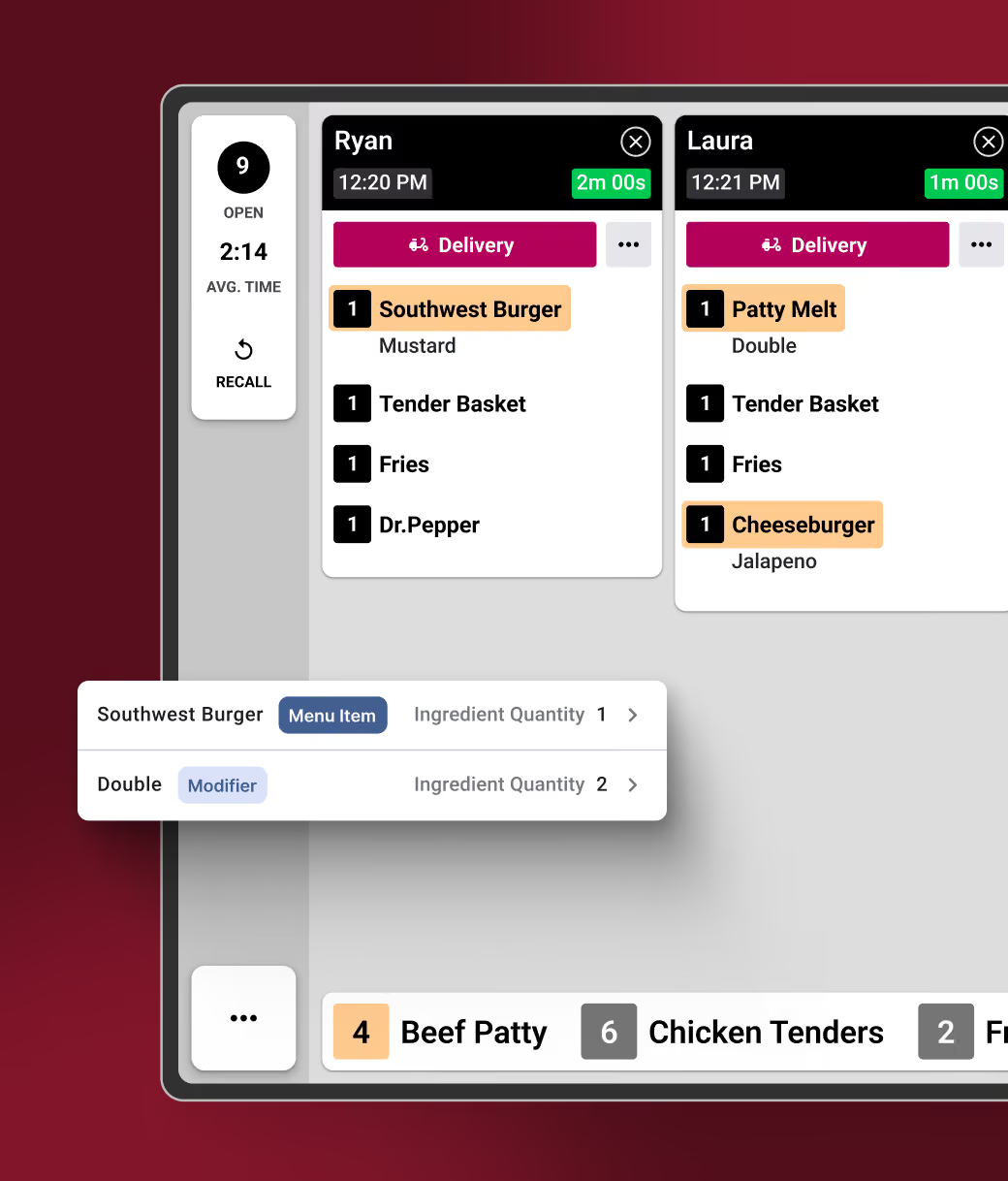
Prep the right amount without counting tickets

Fresh KDS order screen with open tickets for Ryan and Laura, including delivery orders and prep timers.

Keep every station in sync

Fresh KDS Prep Stations 2 and 3 routing orders into the Expo station for coordinated fulfillment.

Adapt the KDS to the way your kitchen runs

Fresh KDS Execution alerts flagging a long-cook-time Beef Wellington and large incoming orders.

Brand-wide KDS control

Configure screens, reuse settings across locations, and push approved changes remotely without updating devices one by one.

Contact sales
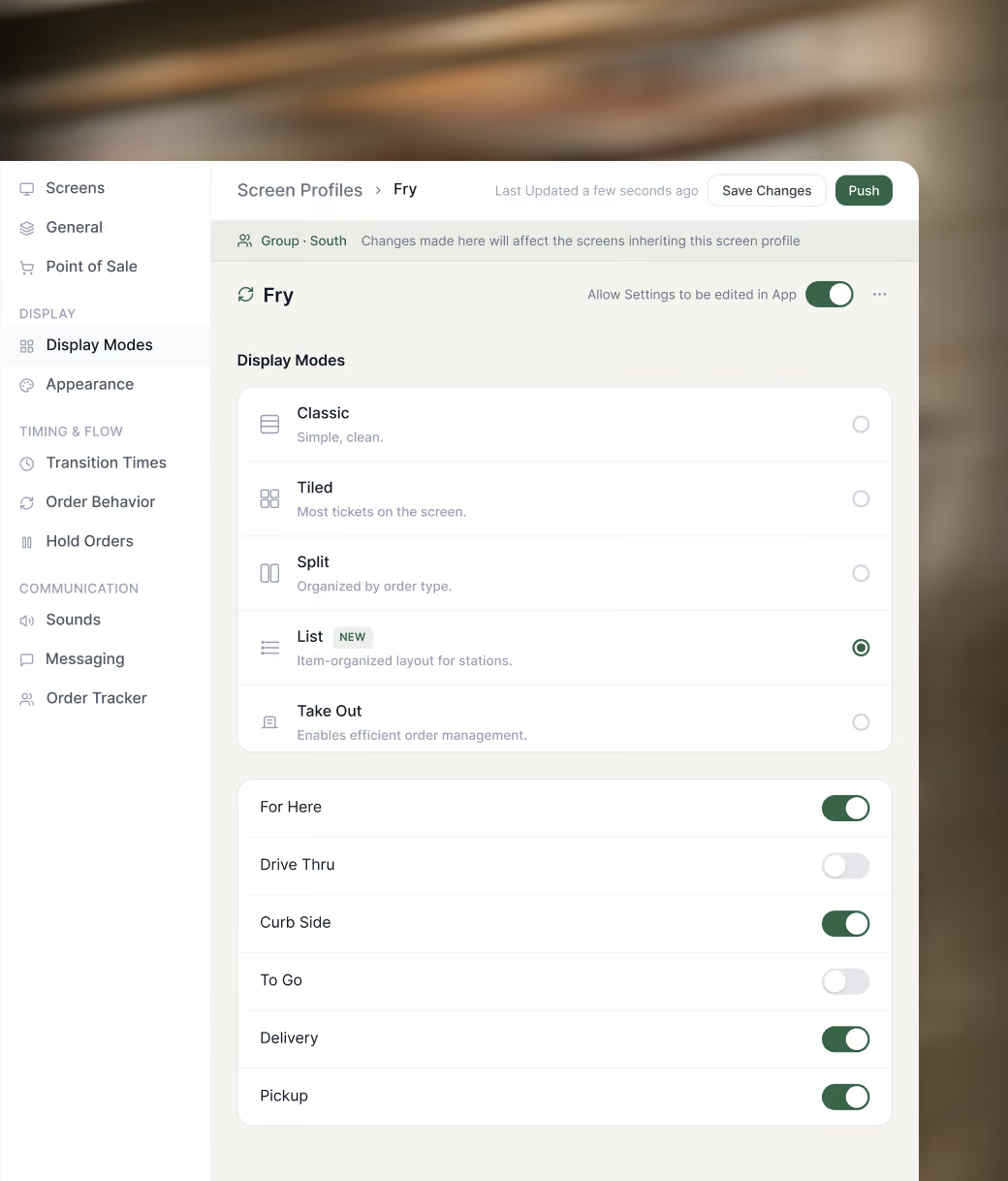
Make changes without waiting on development

Fresh KDS Governance settings for a Fry station profile, with Classic and List display modes and order-type toggles.

Set up screens without starting from scratch

Fresh KDS Governance dashboard of station profiles across locations, showing KDS versions and statuses.

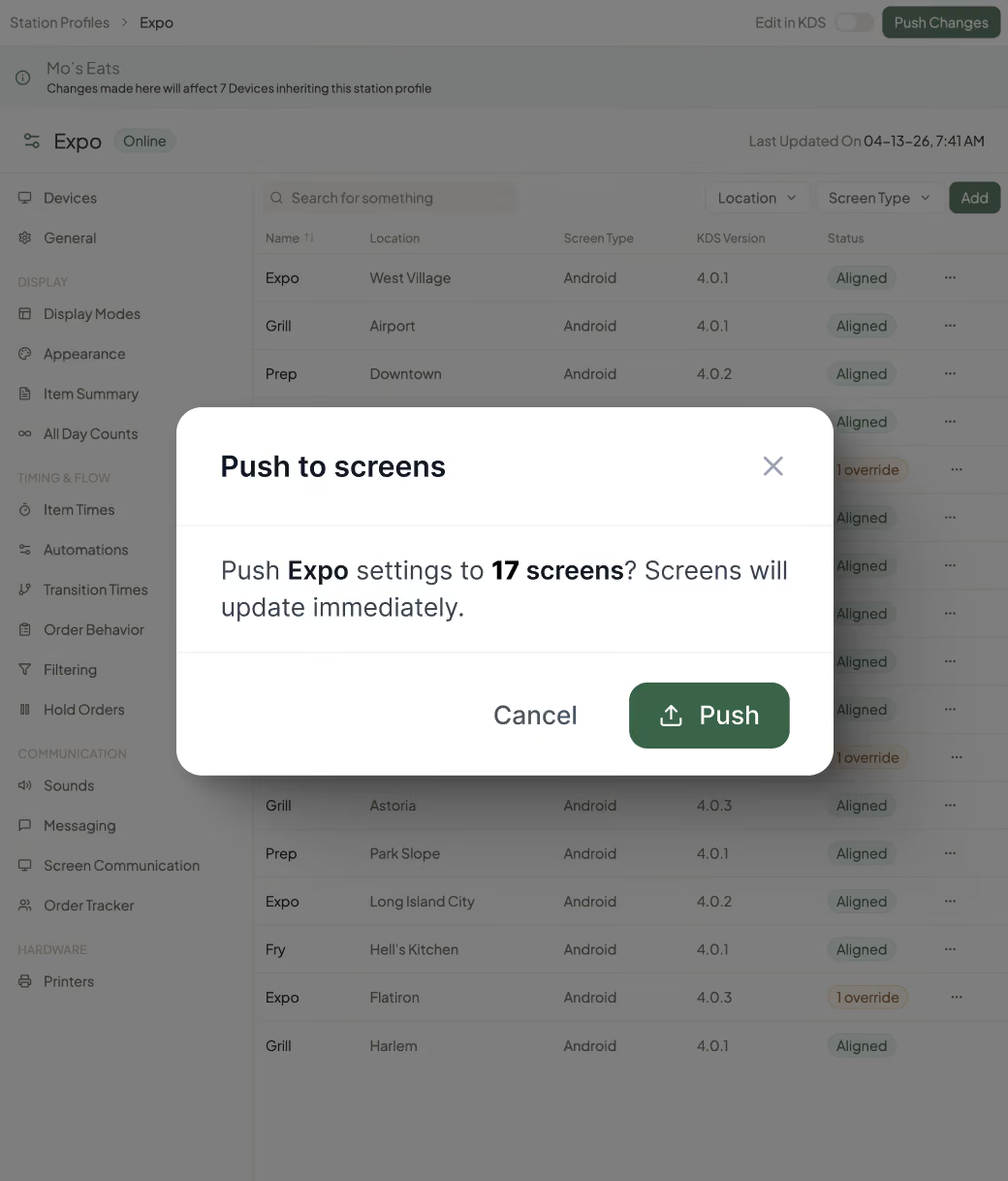
Push changes in seconds

Fresh KDS Governance prompt pushing Expo settings to 17 screens across locations at once.
Kitchen insights

Know what to improve without digging through the data

Fresh KDS highlights key performance issues and offers tailored recommendations based on your kitchen's data.

Each recommendation names the issue, suggests what to change or investigate, and shows the evidence behind it, from the station and time involved to the orders and guests affected.

Contact sales
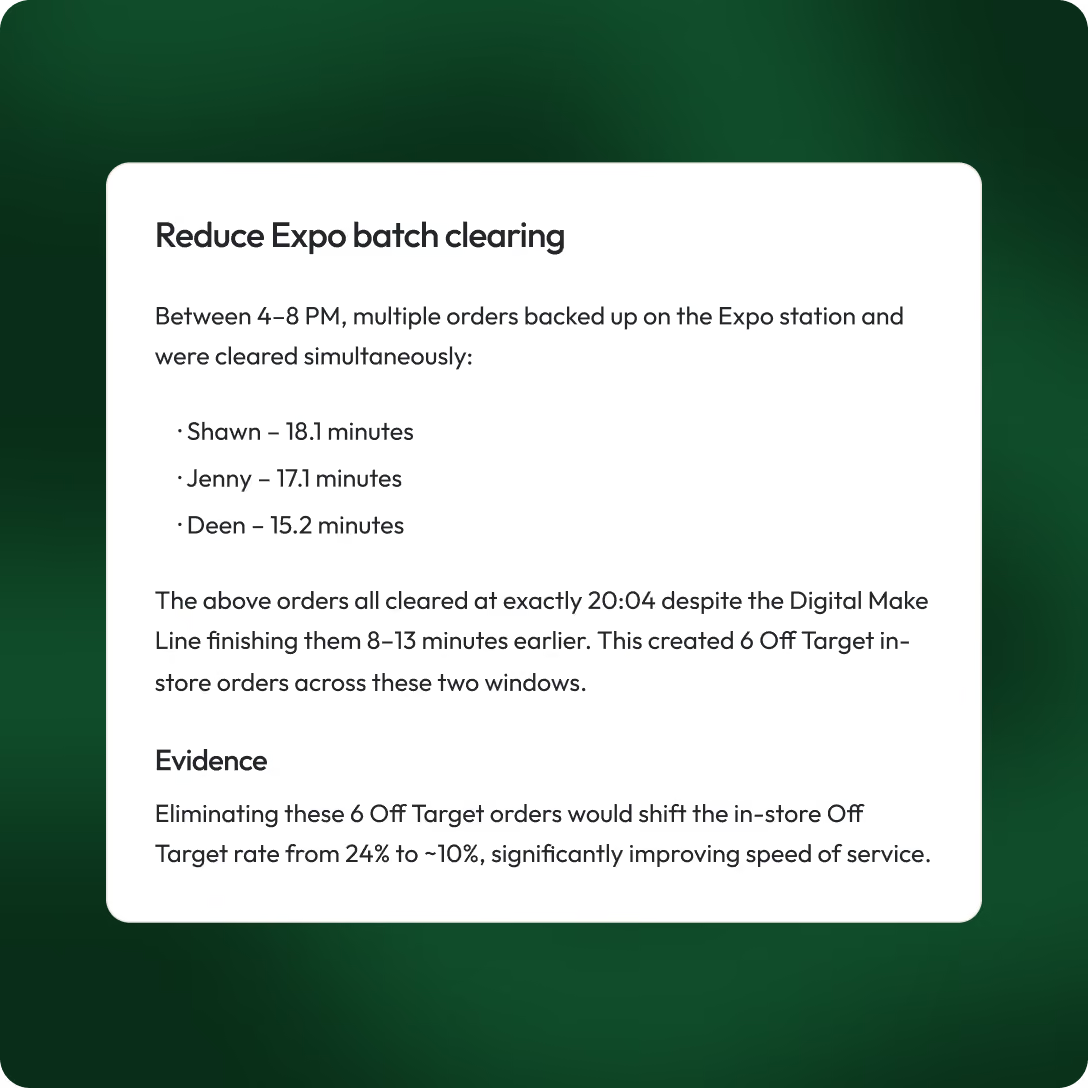

Fresh KDS insight recommending shorter Expo batch-clearing times to improve order speed.
Fresh KDS Insights feed of kitchen operations improvements with timestamps and status indicators.Fresh KDS Insights feed of kitchen operations improvements with timestamps and status indicators.
Enterprise implementation

Get every location up and running faster

Fresh KDS reduces the hardware, integration, configuration, and training work that slows enterprise deployments.

Keep compatible displays already in your kitchens
Connect with 35+ POS and ordering integrations
Reuse proven setups to get locations and teams running faster
Contact sales
Enterprise implementation

A clear path from kickoff to launch

A dedicated Fresh KDS team guides your rollout from planning through launch, adapting the process to your operation and supporting your kitchens every step of the way.

Contact sales
1

Plan

Align on your goals, systems, locations, and the right approach for your rollout.
2

Configure

Set up Fresh KDS around your integrations, screens, workflows, and operating needs.
3

Validate

Test the setup with your team, make adjustments, and confirm everything is ready.
4

Launch

Bring locations live on the schedule that works for your brand, with ongoing support from Fresh.
Partnership

Built to scale with your operation

Contact sales
100+

Taziki’s locations running Fresh KDS across its growing restaurant operation

15+

Years partnering with Taziki’s as its brand and restaurant footprint have grown
"One of the key things for a growing restaurant is technology. Fresh KDS came along and helped empower our business to structure what it does and prepared it to scale."
Dan Simpson, Chief Executive Officer at Taziki's Mediterranean Cafe

faqs

Got questions? We got answers.

Get support
How does Fresh KDS receive restaurant orders?
What does “on time” mean in Fresh KDS?
Does Fresh KDS require proprietary hardware?
Which point-of-sale systems integrate with Fresh KDS?
What is Enterprise Remote Screen Configuration?
Can different brands or locations use different settings?
How long does an enterprise rollout take?
Can we begin with a pilot?
What support do enterprise customers receive?
How is Fresh KDS Enterprise priced?

Ready to know which promises your kitchens are keeping?

Thirty minutes with the team that built the platform. We'll show you how multi-location operators measure on-time performance across every location, and if a pilot makes sense, we'll define success criteria together before you spend a dollar on the fleet.
Contact sales
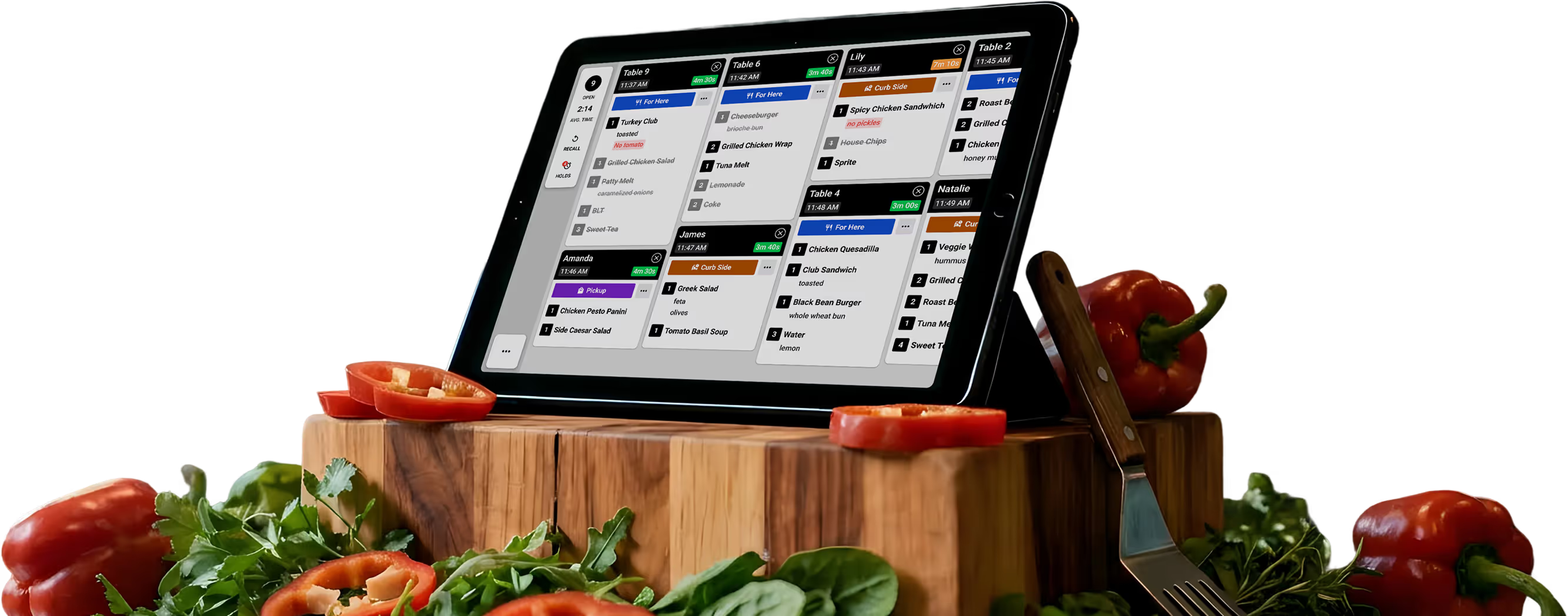
Tablet displaying a restaurant order management system on a wooden cutting board with sliced red bell peppers, leafy greens, a fork, and whole bell peppers around it.